- Thermal printer58 or 80 mm, ESC/POS
- Paper rollSame width as the printer
- USB or LAN cableUSB driver, or the printer's IP
- Owner loginOr a manager PIN
Open printer settings
Click More → Settings → Printers.
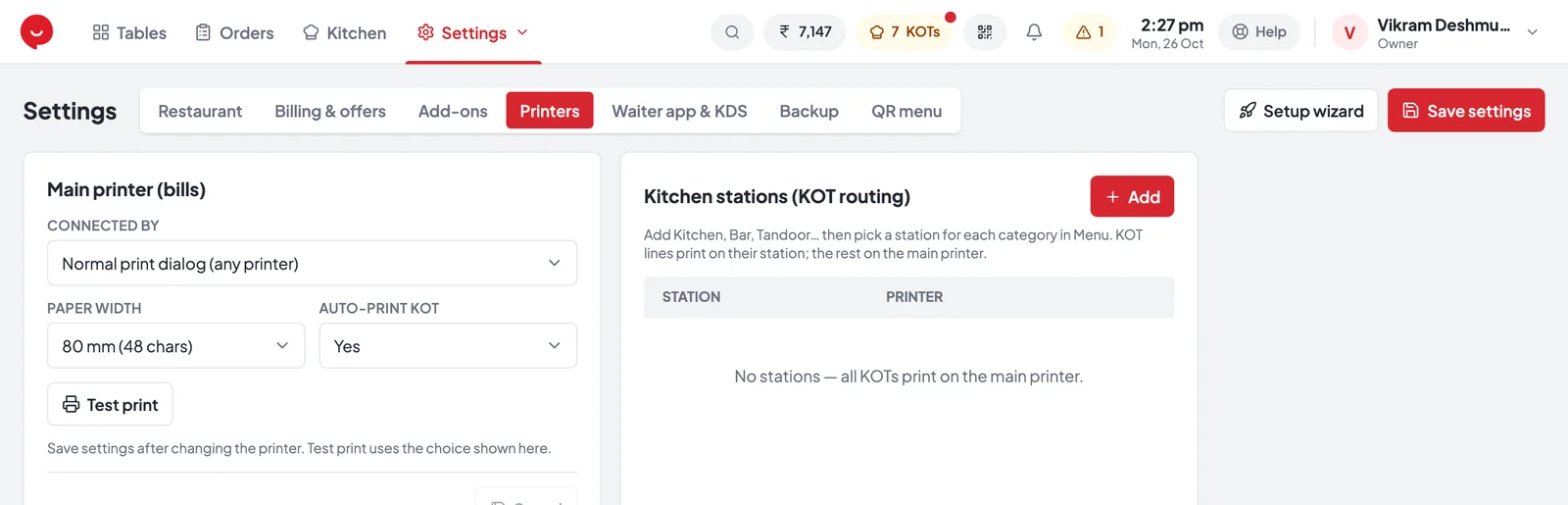
- 1Printers tab in Settings
- 2Connected by — how the bill printer is connected
- 3Paper width — 80 mm or 58 mm
- 4Auto-print KOT — KOT prints as soon as an order is sent
- 5Test print — check the printer after saving
- 6Add a kitchen, bar or tandoor printer
- 7Save settings — always save before a test print
Connect the bill printer
Under Main printer (bills), choose how it’s Connected by.
- 1Install the printer’s Windows driver (CD or maker’s website).
- 2Choose USB thermal printer (silent).
- 3Pick it in the USB printer list — press Refresh list if it’s missing.
- 1Print the printer’s self-test page — on most printers, hold the feed button while switching it on.
- 2Choose LAN / network thermal printer (silent).
- 3Type the LAN printer IP from that page. Keep Port as 9100.
- 1Choose Normal print dialog (any printer).
- 2Works with any printer, even A4 — but the Windows print window opens for every bill.
- 3Use it only until a silent option is set up.
Choose paper width, save and test
Match the paper roll in your printer, then print a test page.
- 1Paper width
80 mm (48 chars) for most printers, 58 mm (32 chars) for small ones.
- 2Auto-print KOT
Leave on Yes — the KOT prints when an order is sent.
- 3Save settings
Top right of the screen. Always before testing.
- Test print
A short test page should come out straight away.
Add kitchen and bar printers
Optional — without stations, every KOT prints on the bill printer.
- 1Under Kitchen stations (KOT routing), press Add.
- 2In New kitchen station, type a Station name (Kitchen, Bar, Tandoor…), the printer’s Printer IP and its Paper width. Press Save.
- 3In More → Menu, edit each category and pick its Kitchen station.
- Paneer TikkaStarters
- Dal TadkaMain Course
- 2 × Butter NaanBreads
- Sweet LassiBeverages
Paneer Tikka · Dal Tadka
2 × Butter Naan
Sweet Lassi
Cash drawer
The drawer opens through the bill printer — no separate setup.
To check it, press Open cash drawer in printer settings. It works with a USB or LAN bill printer, not with the normal print dialog.
If it doesn't print
Quick checks before calling support — tap a problem to see the fix.
Nothing prints
Check the printer is on and has paper. In Settings → Printers press Test print. USB: reinstall the printer’s Windows driver. LAN: check the IP on the self-test page.
The kitchen printer misses KOTs
While it’s off, its KOTs print on the bill printer and you get a warning. Check its IP in Kitchen stations and the network cable.
Text is cut off or too small
The Paper width doesn’t match the roll. 80 mm rolls → 80 mm (48 chars), 58 mm rolls → 58 mm (32 chars).
The print window opens for every bill
Connected by is set to Normal print dialog. Switch to USB thermal printer (silent) or LAN / network thermal printer (silent).