- Your roomsAC hall, non AC, garden, rooftop…
- Table namesShort ones, like T1, N1, G1
- Seats per tableShown on each table tile
- Owner or manager loginTable setup is in More
Open Table Setup
Click More → Table Setup.
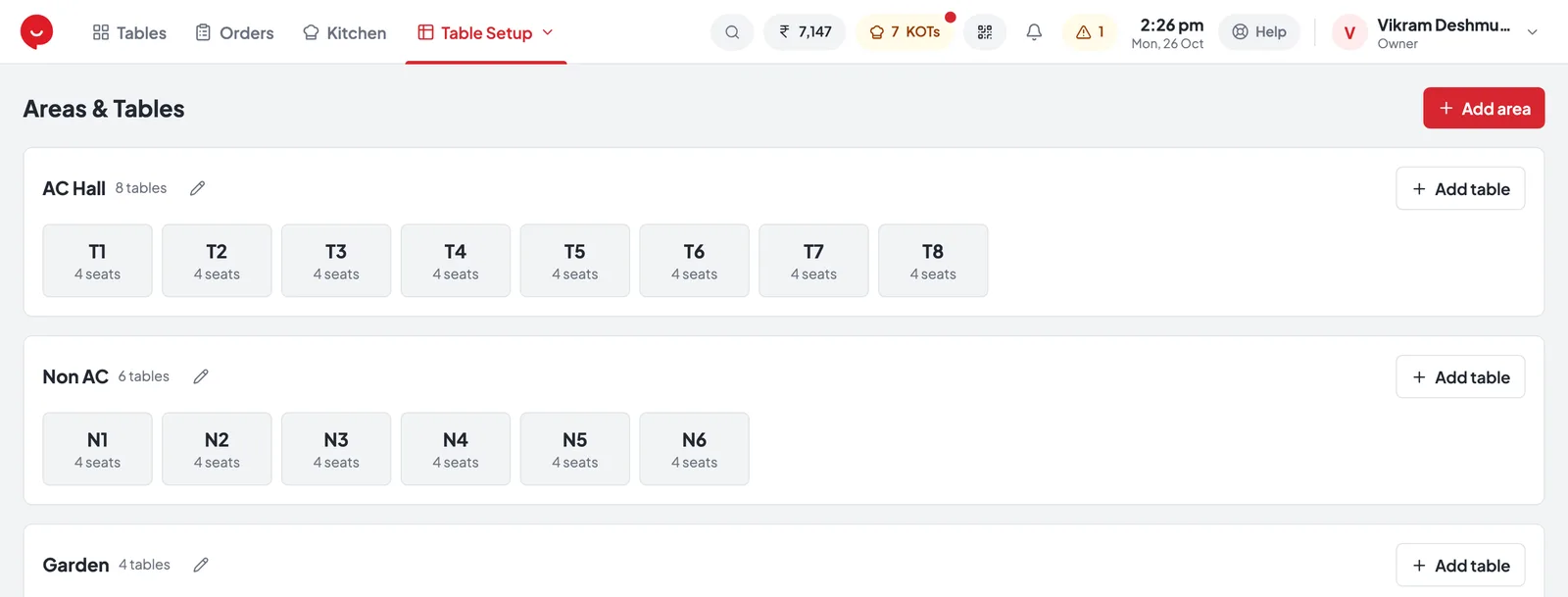
- 1Add area — a room or section (step 2)
- 2Edit area — the pencil next to its name: rename, order or pricing
- 3Add table — a table in this area (step 3)
- 4A table — click it to rename, change seats or move it
Add an area
Press Add area for each room, fill in New area and press Save.
AC Hall, Non AC, Garden, Rooftop…
The order areas show on the Tables screen.
+ ₹ per item or + % per item — optional (step 4).
Add tables
On an area, press Add table, fill in New table and press Save. Repeat for every table.
Short and clear, e.g. T1 or G2.
Shown on the tile, e.g. 4 seats.
Which room it belongs to — change it to move the table.
Higher prices in one area
Optional — Edit area → Area pricing. Every item in that area costs more.
- Choose + % per item or + ₹ per item and type the Amount. 0 means the normal menu price.
- The area shows prices +10% (or + ₹) next to its name in Table Setup.
- Pick up and delivery orders aren’t in an area, so they always use the menu price.
Common questions
Tap a question to see the answer.
Do parcel and delivery orders need a table?
No. Press Pick Up or Delivery on the Tables screen instead — they use the normal menu price.
A table moved to another room
Click the table in Table Setup and change its Area. Save.
How do I remove a table?
Click it in Table Setup and press Delete. Areas have Delete in Edit area too.
Fastest way to open a table at the counter?
On the Tables screen, type the table number and press Enter.